How do I create a web story? Step-by-step tutorial with inspiring examples
It's decided: this year, you want to boost your brand communication with engaging content formats that capture attention, increase engagement and support your marketing goals.
One format stands out: web stories.
Combining the immersive experience of social media stories with the discoverability of the open web, web stories allow brands, publishers and e-commerce companies to tell visual stories that can be understood by AI systems, indexed by search engines, shared across channels and integrated directly into websites.
This shift toward visual-first content is backed by Wyzowl’s 2026 video marketing data, which shows that 82% of marketers report good ROI from video marketing, while 84% of consumers say they want to see more videos from brands.
But how do you create a web story that actually drives results?
In this tutorial, we'll walk you through the process step by step and share inspiring web stories examples to help you get started.

What is a web story?
A web story is a full-screen, mobile-first visual content format developed by Google. It combines images, videos, animations, text and interactive elements into a sequence of pages that users navigate by tapping or swiping.
Unlike social media stories that disappear after 24 hours or remain dependent on platform algorithms, web stories live on your website and can be discovered through Google Search, ChatGPT, Gemini or Perplexity.
A web story can be used to:
- Showcase products
- Share brand stories
- Generate leads
- Promote events
- Increase conversions
- Improve website engagement
- Support SEO strategies
How to create a web story in 8 steps
Do you want to start creating web stories to boost your brand communication? We'll show you how it works with JOIN Stories, our intuitive web story creation platform.
Step 1: Determine the objective of your web story
Before creating any content, determine what you want your web story to achieve.
For example:
- Increase brand awareness
- Promote a product launch
- Generate leads
- Drive traffic to a landing page
- Improve conversion rates
- Decrease bounce rates
- Educate potential customers
Once your objective is clear, identify the key message you want users to remember after viewing the story.
💡 Pro tip: Use only one primary goal per web story. Trying to achieve multiple objectives often reduces performance.
Step 2: Create a storyboard for your web story
Even short content requires planning.
Before designing your story, create a storyboard outlining:
- The sequence of pages
- Key messages
- Visual assets
- Calls-to-action
- Links and interactions
A simple structure could look like this:
Page 1: Grab attention. Page 2: Introduce the problem. Page 3: Present the solution. Page 4: Show benefits. Page 5: Add social proof. Page 6: Drive action
Keep it concise -> The best-performing web stories are usually short and focused. As a general rule:
- 4 to 8 pages
- Each page should communicate one idea
- Videos should remain short and impactful
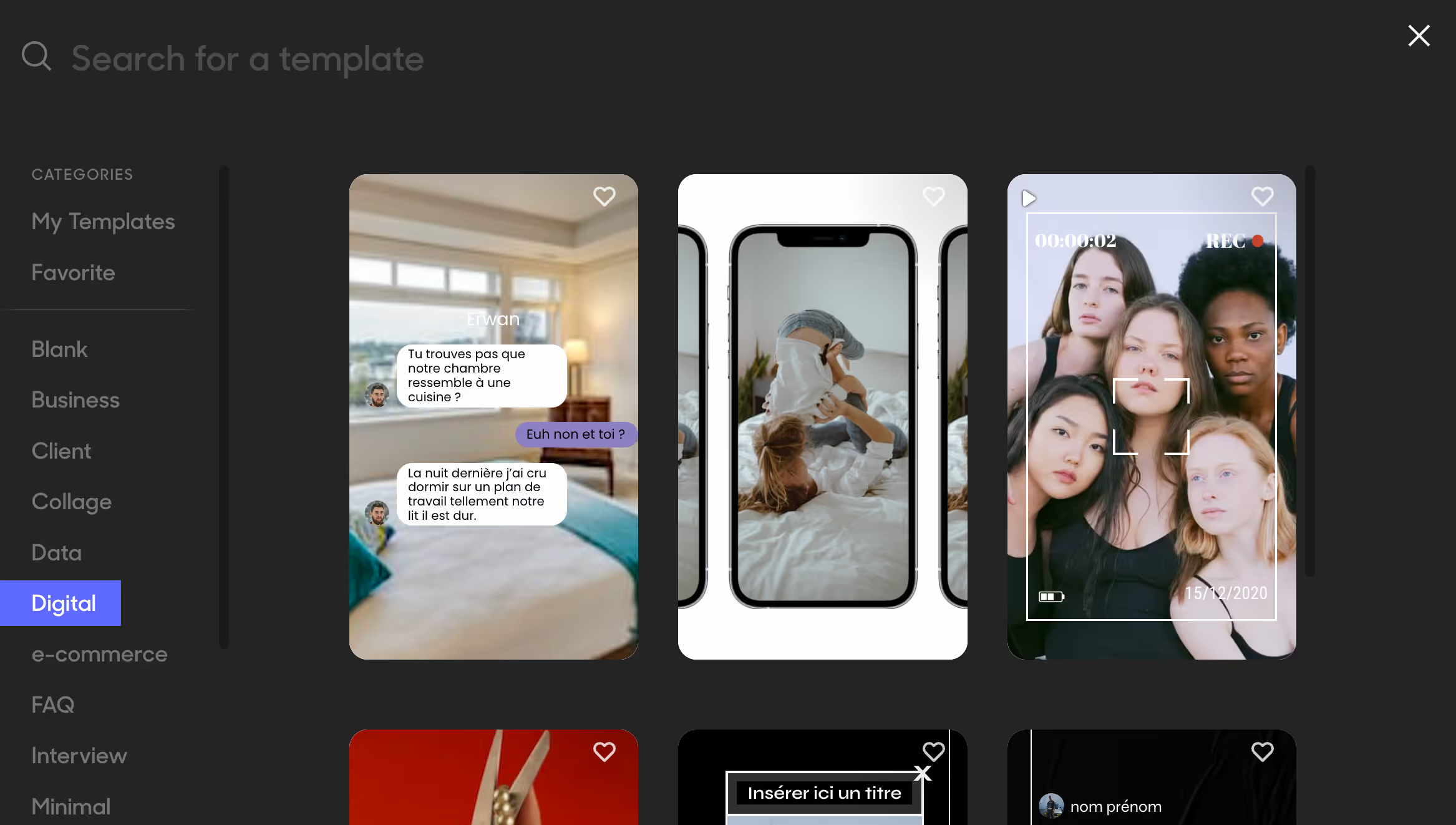
Step 3: Choose a page template
The next step is selecting a page template or design framework.
Templates help maintain visual consistency, readability, mobile responsiveness, and user experience.
Depending on your objective, you may choose templates designed for:
- E-commerce
- Product launches
- Employer branding
- Lead generation
- Events
- Educational content
Because JOIN Stories is built specifically for creating engaging web stories, our design experts have created a library of fully customizable templates tailored to a wide range of marketing goals. Whether you're promoting products, generating leads or building brand awareness, you can quickly create a web story that matches your visual identity and objectives.
Step 4: Add images, videos and visual assets
Visual content is the foundation of every successful web story,. Consider using:
- Images
- Videos
- GIFs
- Illustrations
- Animations
Whenever possible, prioritize original visuals over generic stock content. Authentic content tends to generate higher engagement and helps reinforce your brand identity.
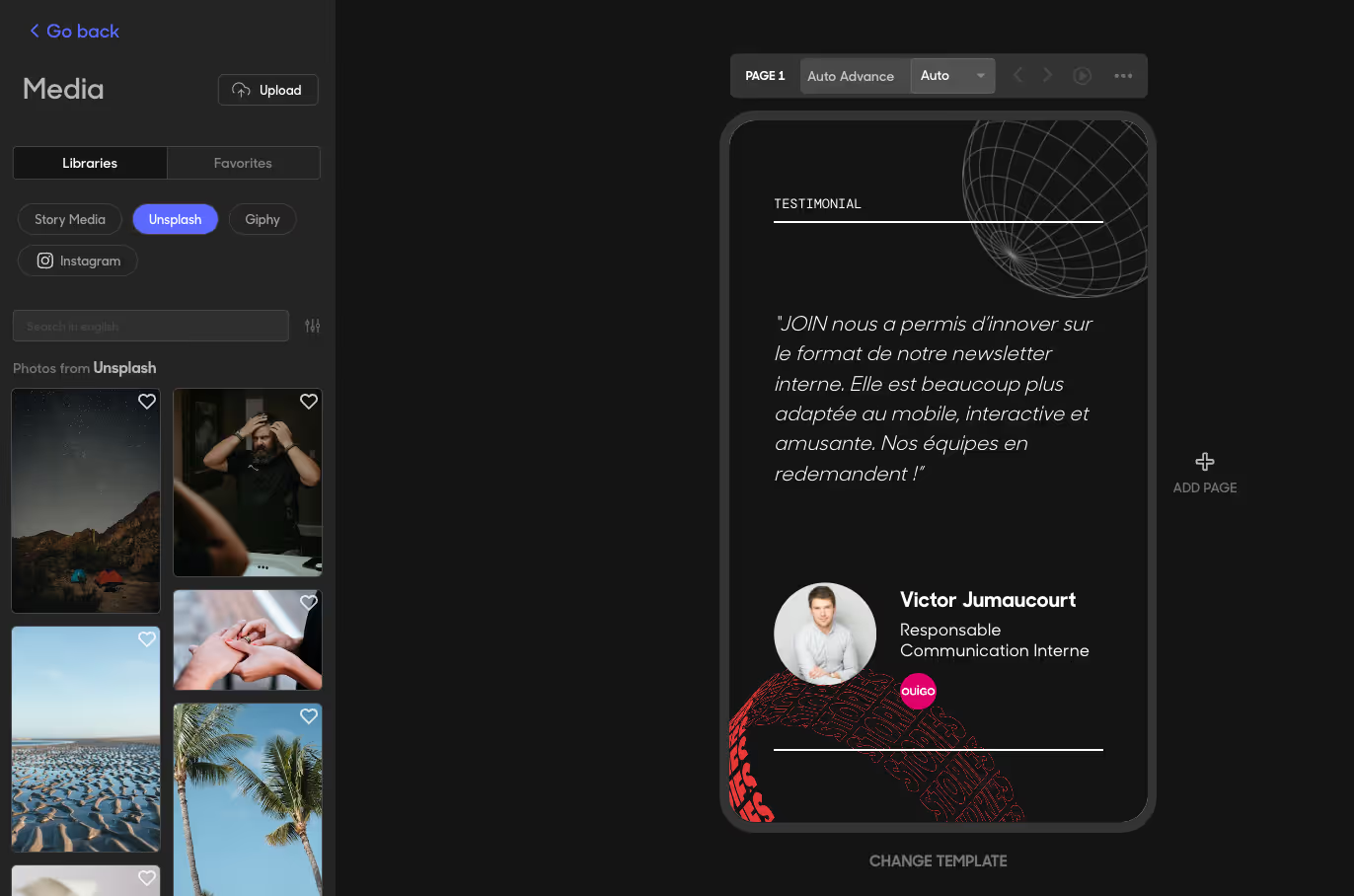
You can easily import assets from:
- Your computer
- Instagram and TikTok accounts
- User-generated content (UGC) featuring your brand
- Existing social media posts
- Image and GIF libraries
Connecting your social media accounts is particularly useful for repurposing content you've already created. For example, you can import posts published on your own Instagram or TikTok accounts, as well as user-generated content from customers, creators or influencers who have tagged your brand.
Use video whenever possible
Video is often the most engaging format in a web story. Best practices include:
- Vertical format (9:16)
- High resolution
- Short sequences
- Subtitles for silent viewing
- Strong opening frames
Optimize visual composition
Keep important content away from the edges of the screen. Focus on:
- Clear focal points
- Readable typography
- Balanced layouts
- Consistent branding
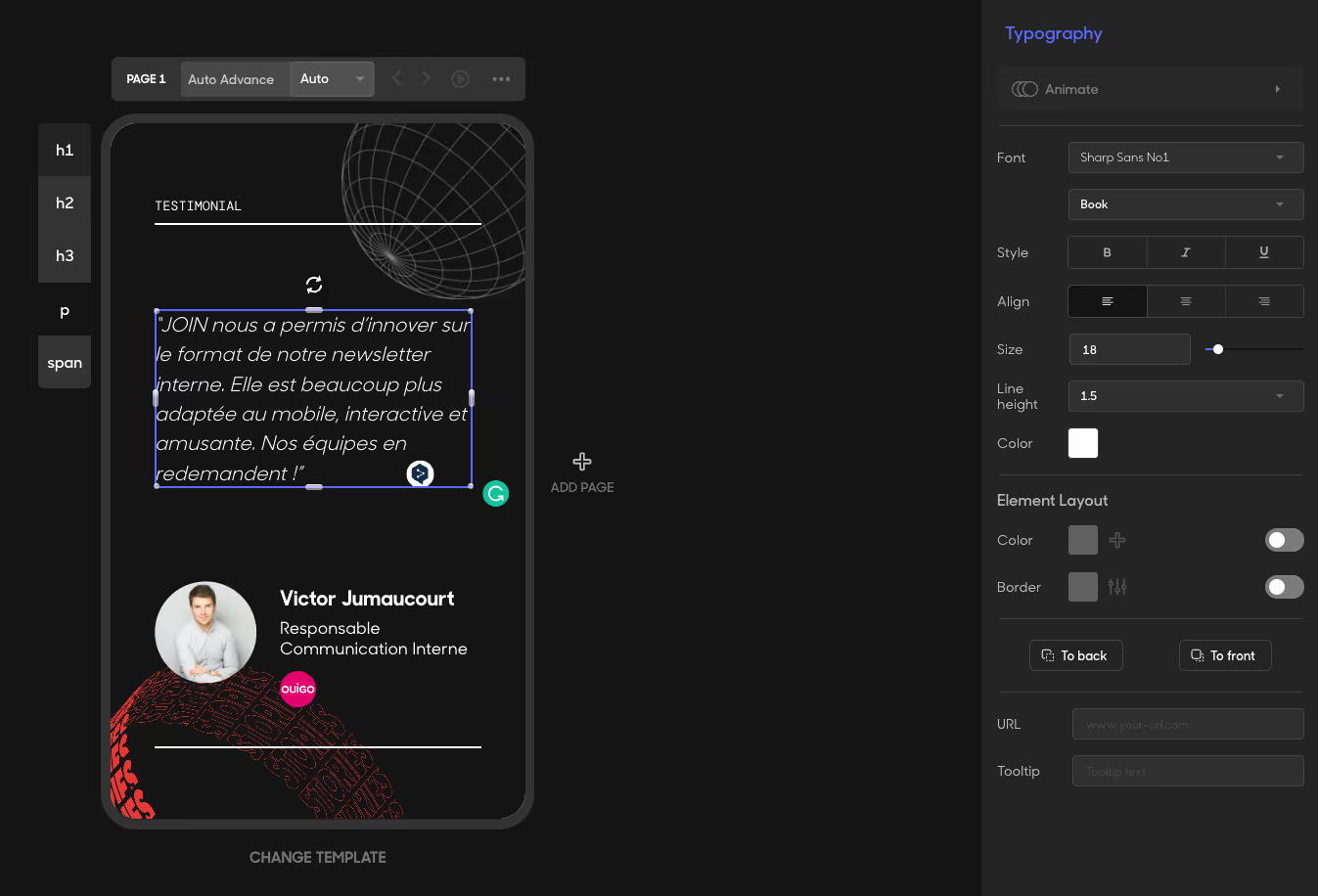
Step 5: Add concise and impactful text
The visuals should tell most of the story. Text should support the message, not overwhelm it.
- Use short sentences
- Focus on one idea per page
- Prioritize clarity over creativity
- Avoid long paragraphs
A good rule of thumb is to keep text under 280 characters per page.
Maintain brand consistency
To strengthen recognition and trust, you should use:
- Brand colors
- Approved fonts
- Consistent tone of voice
Step 6: Add calls-to-action
A web story should always guide users toward a next step. Common calls-to-action include:
- Shop now
- Add to cart
- Add to my wishlist
- See more
- Download the guide
- Subscribe now
- Contact us
Make CTAs impossible to miss
You can place CTAs:
- Near the end of the story
- After presenting value
- On high-engagement pages
You can also increase interaction through quizzes, polls, forms or surveys
These elements create a more engaging user experience while helping collect valuable data.
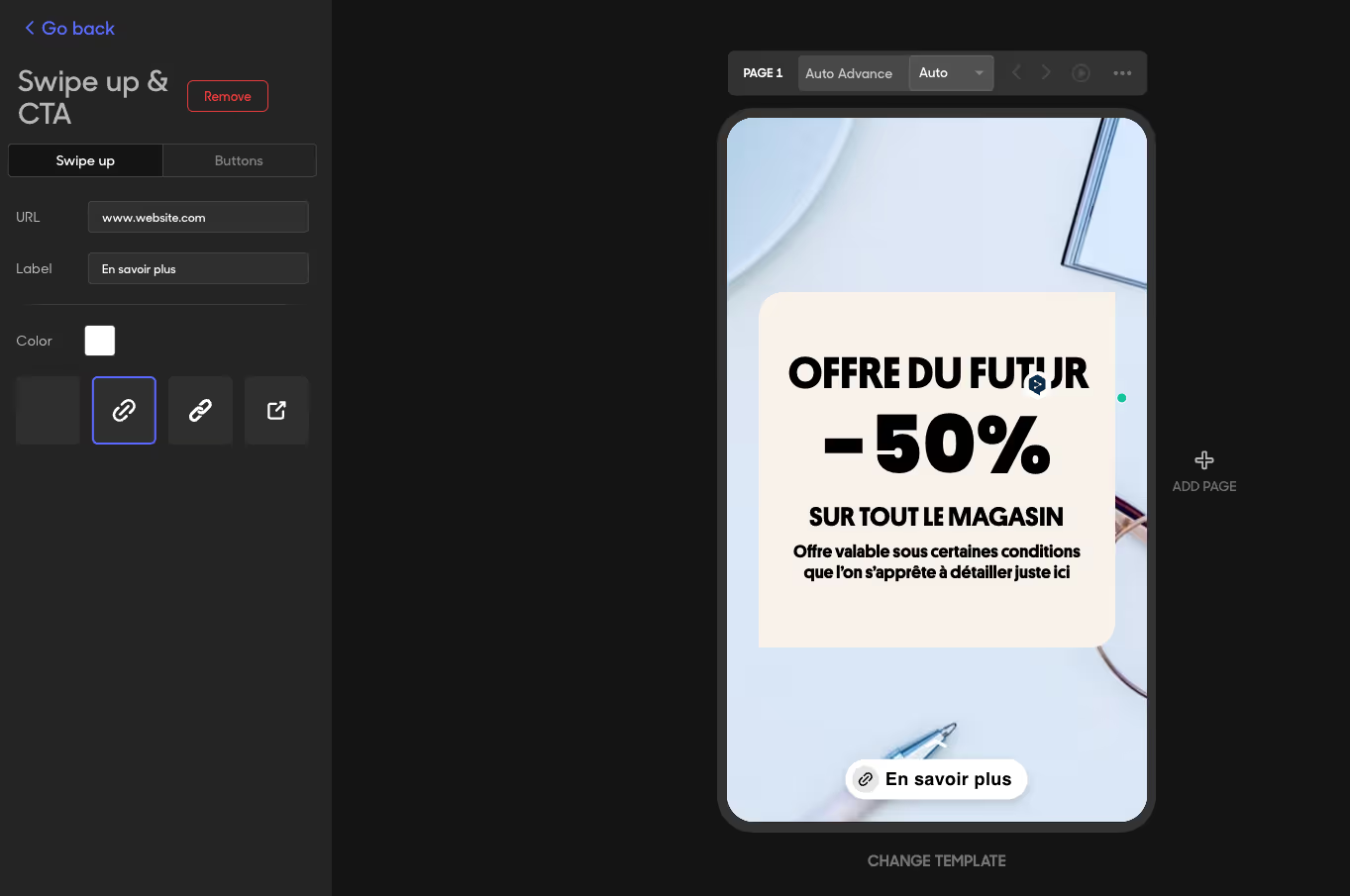
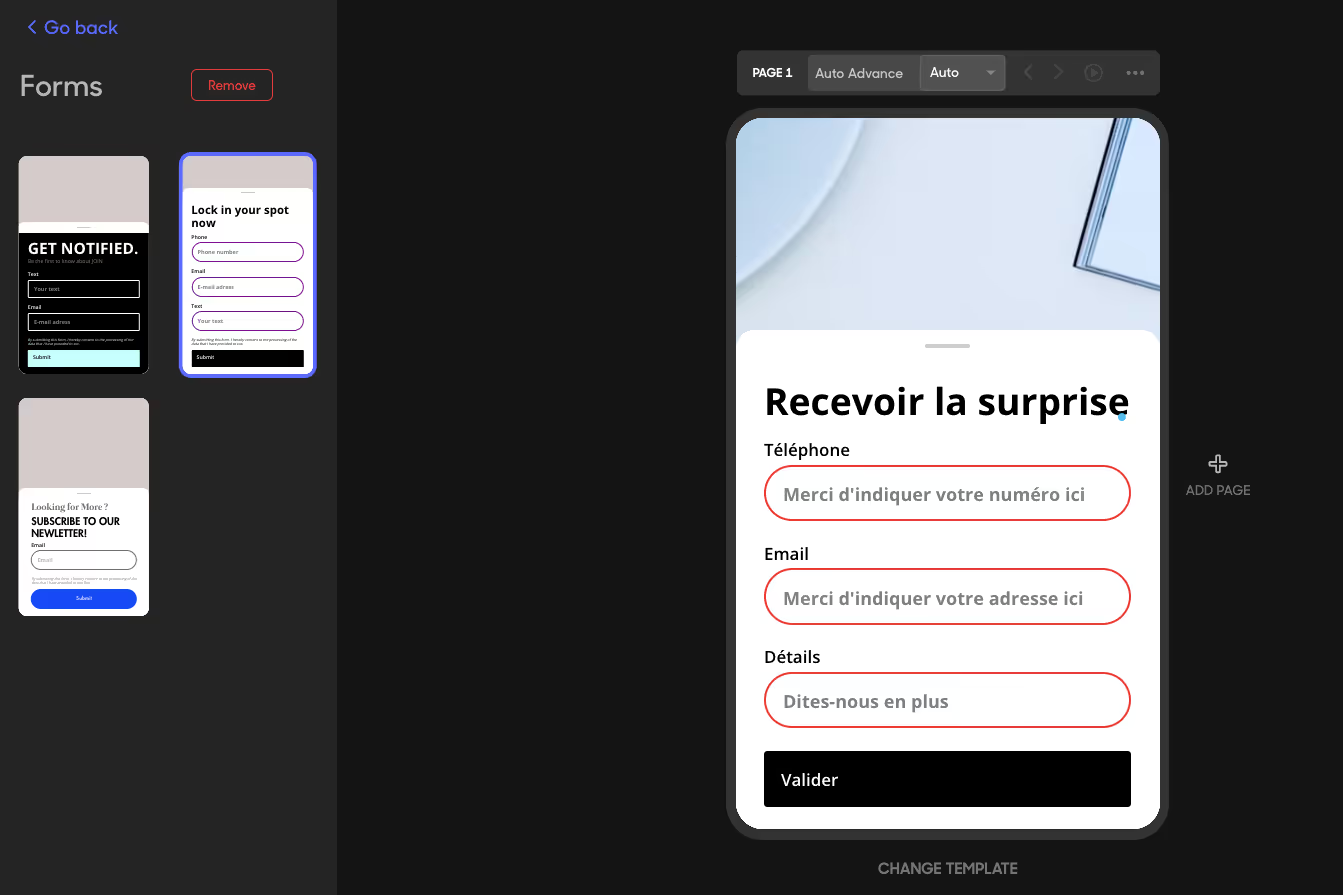
At this stage, your first web story page is ready. Simply repeat the process to add new pages until your story is complete and aligned with the structure you planned in your storyboard.
Step 7: Optimize your web story for SEO and GEO
If you want your web story to generate traffic, it's important to optimize it not only for traditional search engines but also for AI-powered search experiences. Strong metadata, clear structure, high-quality visuals and authoritative content can improve both SEO and generative engine optimization (GEO).
i) Optimize the title
Your title should include your primary keyword naturally.
ii) Write a compelling description
Describe the story clearly while encouraging clicks.
iii) Optimize URLs
Keep URLs short, descriptive and keyword-focused.
iv) Tag relevant keywords
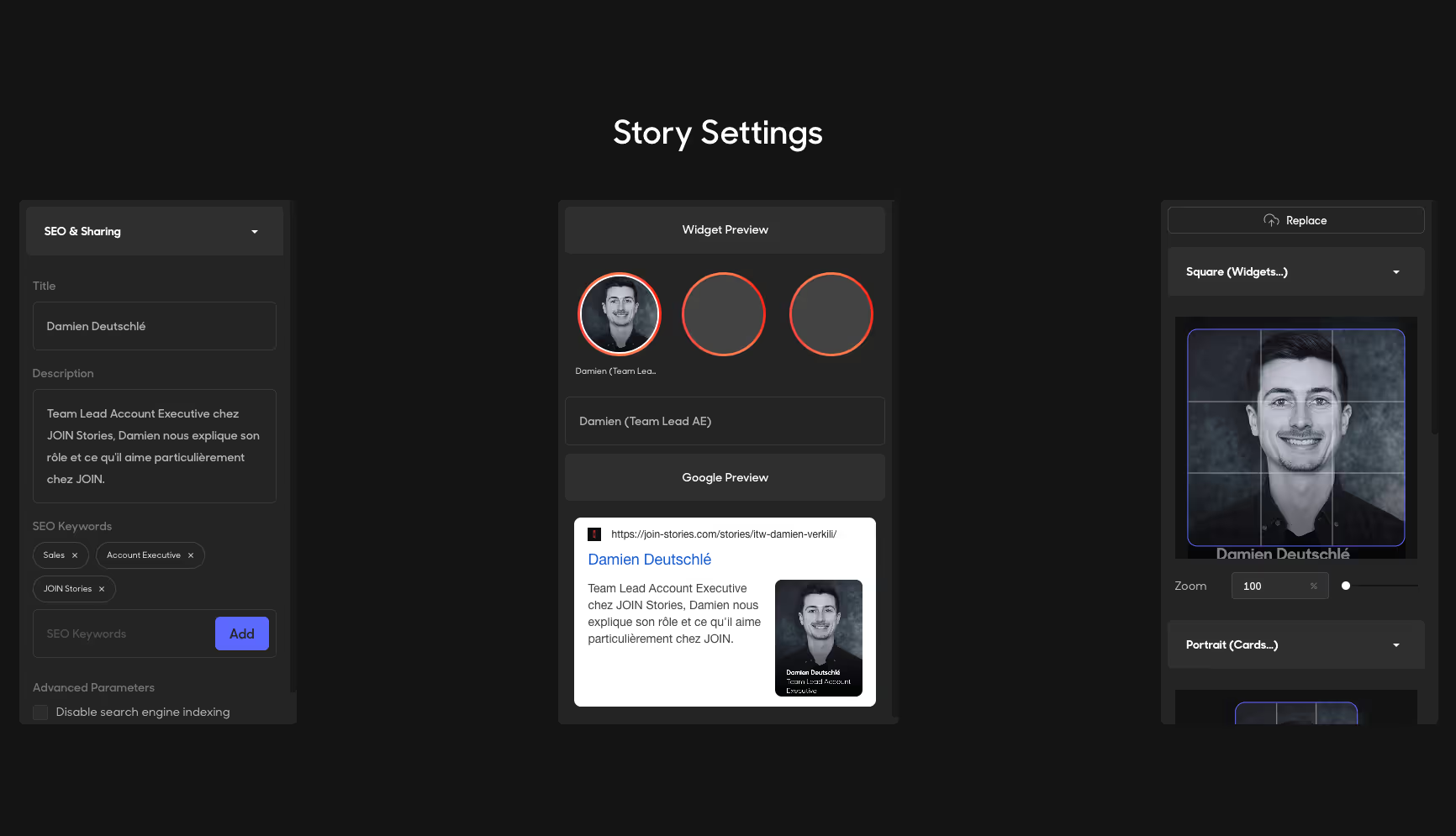
Note: if SEO isn't one of your objectives, you can "deindex" your web stories so they don't appear in Google or other search engine results.
Step 8: Publish and promote your web story
Congratulations: your web story is ready to be published. Now it's time to distribute it across the channels where you want it to be seen.
If you want to embed your web story on your website, JOIN Stories allows you to create a widget that can display one or multiple stories. You can choose from several formats depending on your needs:
- Bubble format: displays multiple stories in a row as clickable bubbles, similar to the Instagram Stories bar.
- iFrame format: allows you to embed a single web story directly into a web page in a vertical format.
- QR code format: generates a scannable QR code that directs users to your web story from their smartphone. This format can be used on web pages as well as printed materials.
Once your widget is configured, the platform generates an embed code that you can insert anywhere on your website to display your web stories.
If you know how to embed a YouTube video on a web page, you'll have no trouble embedding a JOIN web story, it's just as simple.
Depending on your goals, you can also:
- Export your content as a video or static images and use it elsewhere
- Publish your web story directly on your social media channels
- Share your web story through a clickable link in emails, newsletters, presentations or any other digital touchpoint
Well done: you've created your first web story with JOIN Stories 🎉.
Once your story is live, you'll be able to track its performance directly from the platform, including metrics such as views, completion rate, click-through rate and form submissions. Use these insights to continuously optimize your stories and improve results over time.
6 web stories examples that drive results
Bouygues Telecom: combining email, SMS and web stories
Bouygues Telecom used web stories to support the promotion of its Cafeyn offer.
The story format allowed the company to provide richer information without overloading the email or SMS campaign itself.
Key takeaway: web stories work exceptionally well as a complementary channel within broader marketing campaigns.

JOIN Stories: using QR codes to extend engagement
QR codes connected presentations and communication materials to immersive storytelling experiences.
Key takeaway: web stories can bridge physical and digital touchpoints.
Blissim: using influencer content inside web stories
There is nothing better to reassure potential customers than authentic customer content. Blissim showcased user-generated content and influencer recommendations through web stories.
Key takeaway: social proof becomes more engaging when presented in an immersive format.

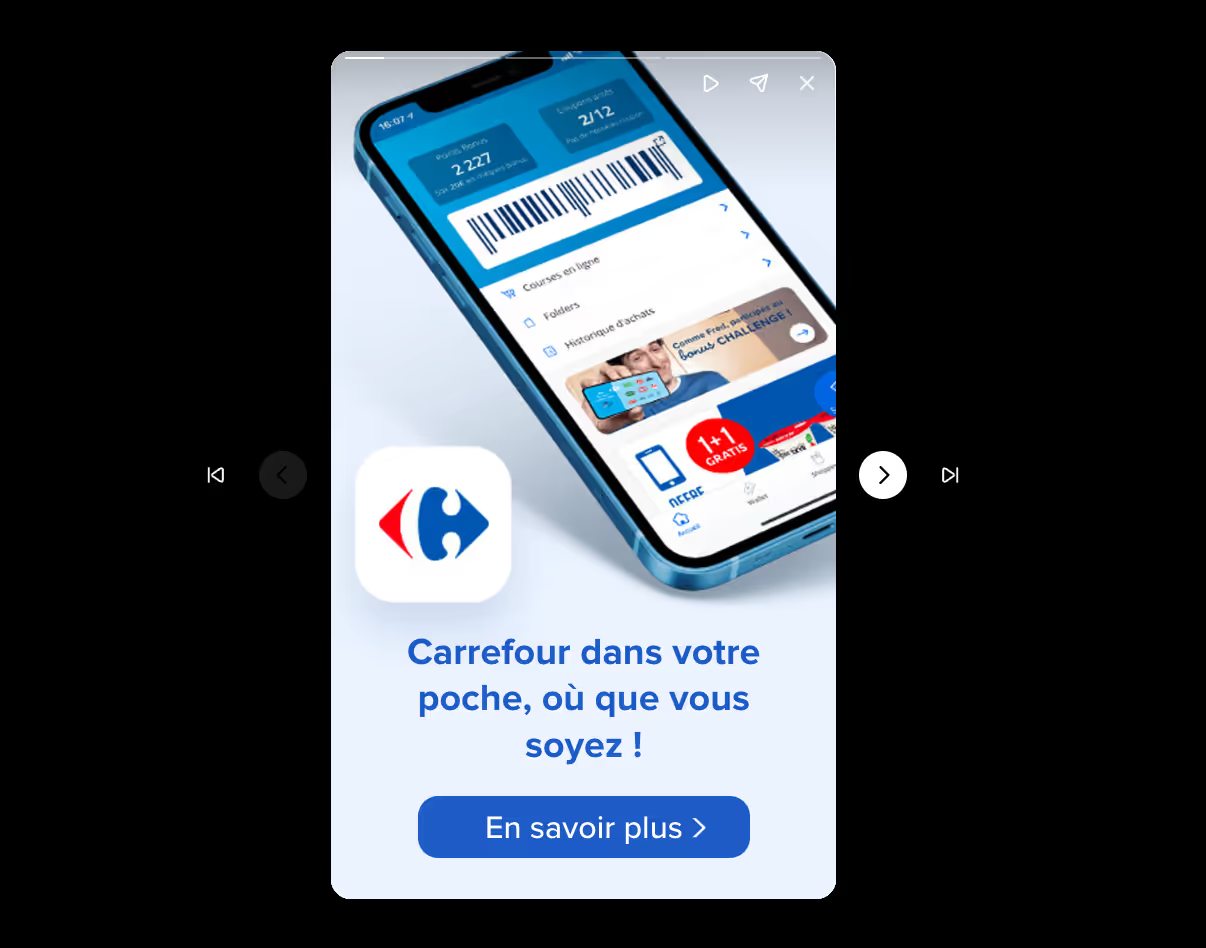
Carrefour Belgium: web stories for e-commerce
Carrefour integrated web stories directly into its online shopping experience. The stories highlight products, promotions and purchasing tips.
Key takeaway: web stories can support product discovery and improve merchandising.
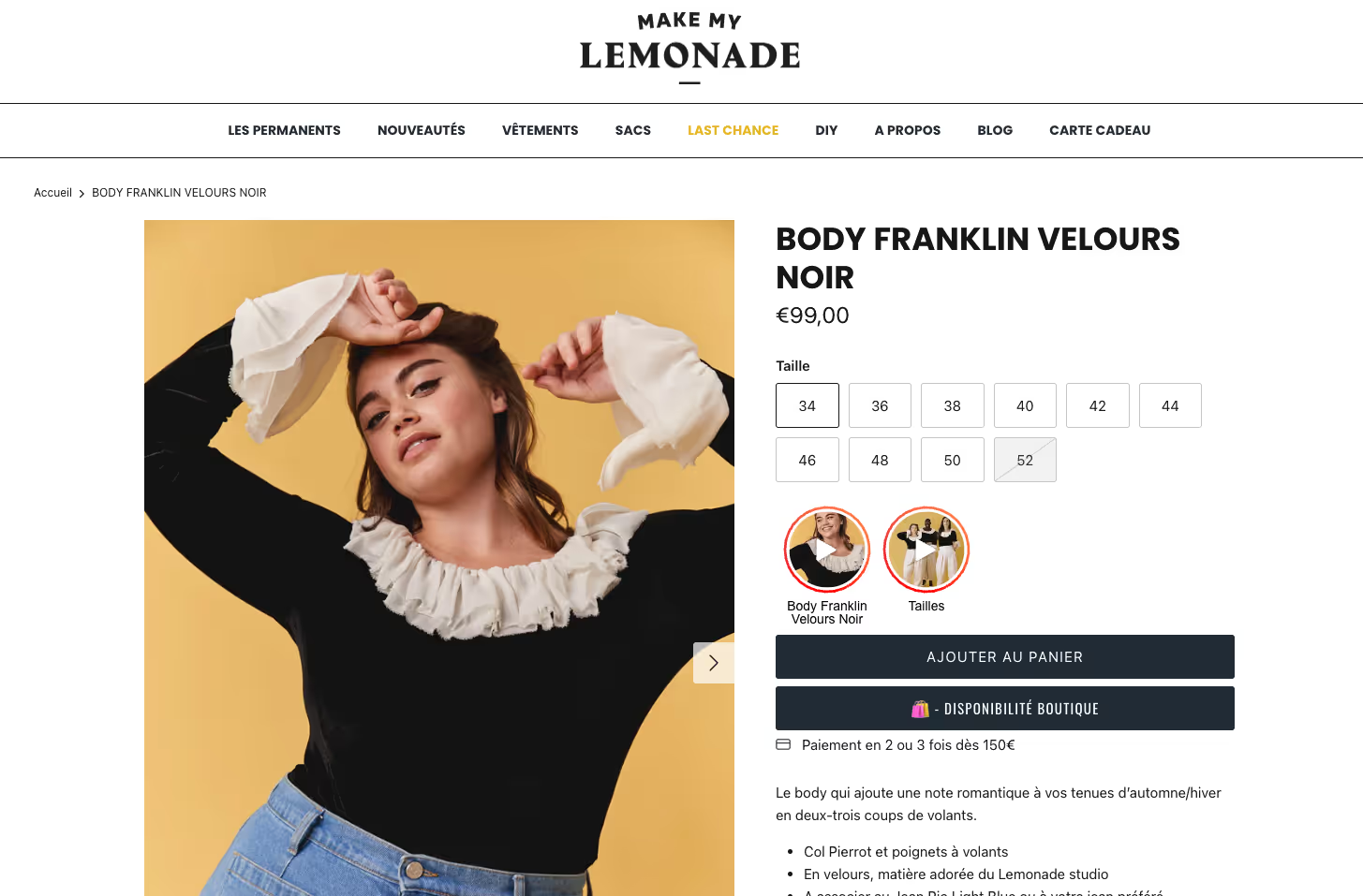
Make My Lemonade: helping shoppers make better decisions
The fashion brand uses web stories on product pages to showcase products in real-life situations.
Key takeaway: web stories reduce uncertainty and support purchase decisions.
Trybus: recruitment through storytelling
Trybus created personalized web stories to approach candidates through LinkedIn and email.
Key takeaway: web stories can humanize outreach and increase response rates.

Best practices for high-performing web stories
Focus on one message per page
Avoid trying to communicate too much information at once.
Prioritize video over text
Video usually delivers stronger engagement than static visuals.
Design for mobile first
Every element should be optimized for smartphone users.
Keep stories short
Shorter stories generally achieve higher completion rates.
Always include a clear CTA
Every story should guide users toward a measurable action.
4 common web story mistakes to avoid
Adding too much text
Users scan stories quickly. Long paragraphs reduce engagement.
Using low-quality visuals
Poor visuals weaken credibility and retention.
Overwhelming users with animations
Motion should support the story, not distract from it.
Forgetting conversion objectives
A beautiful story without a clear business goal rarely delivers meaningful results.
FAQ about creating web stories
What is the best tool to create a web story?
The best tool depends on your goals. Many brands choose specialized web story platforms because they simplify design, SEO optimization, publishing and analytics. We also wrote an article comparing the best shoppable video platforms in 2026 to help you choose.
JOIN Stories is often chosen for its flexibility, fast deployment and expertise in creating video-first experiences designed to increase engagement and conversions.
How many pages should a web story contain?
Most effective web stories contain between 4 and 10 pages, depending on the complexity of the message.
Are web stories good for SEO?
Yes. Web stories can be indexed by Google, appear in Discover and contribute to your overall content visibility strategy.
Can web stories increase conversions?
Yes. When combined with clear calls-to-action, web stories can help drive leads, sales, bookings and newsletter sign-ups.
Many JOIN customers have reported significant conversion improvements after integrating web stories into their websites, with results ranging from +20% increases to x6 their previous conversion rates, depending on the use case and industry.
What is the difference between a web story and an Instagram story?
Instagram Stories live within Instagram and depend on the platform's algorithm. Web stories are hosted on your website and can generate organic traffic through search engines.
Conclusion
Creating a web story is no longer reserved for publishers or large brands. With the right strategy, visuals and storytelling approach, web stories can become a powerful asset for increasing engagement, improving SEO visibility and driving conversions.
By following the eight steps outlined in this tutorial and drawing inspiration from successful web stories examples, you'll be ready to create immersive experiences that capture attention and deliver measurable marketing results. Another possibility is to test with some widgets to compare the best Web Stories platforms.
{{cta}}